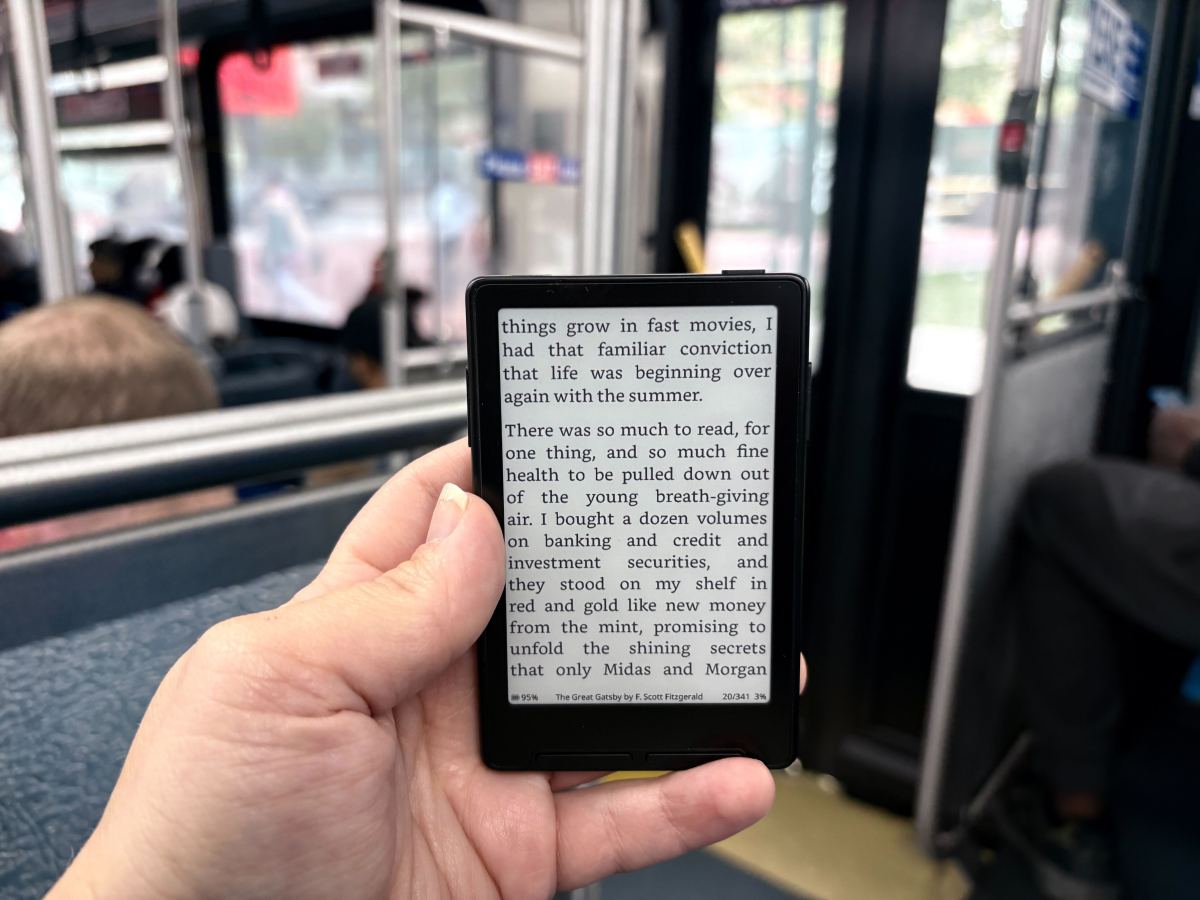
It was love at first sight. It felt like scouring the mall, dipping in and out of sprawling department stores in search of a specific, elusive item, only to finally find what you’re looking for. Only, I didn’t even know I was searching for something like the Xteink X3, because I never dared dream of something so delightful: a tiny, MagSafe-compatible e-ink reader that could attach to my iPhone like a Pop Socket.
This was it. My life would change forever. I would get my hands on the Xteink X3, and I would stop doomscrolling forever. I would read more books than ever before… which is saying something, since – brag – I read at least 50 books a year. But – not a brag – I probably spend even more time on social media than I do reading. I know that I feel generally less anxious when I limit my social media time, but alas, the siren song of TikTok beckons me. What if instead of opening social media, I could just flip my phone over and read on a tiny, Kindle-like e-ink screen? Could this $80 gadget fix me?
I’ve tried reading books (… or downloads from AO3) on my phone, immersing myself in a fictional world, rather than posts from the president in which he threatens to obliterate an entire country. But something about looking at my phone, where I’m constantly tempted to open Instagram to see whatever Reel someone sent me, doesn’t quite soothe me the way that a book or an e-ink device like a Kindle does.
I was so excited for my X3 to arrive that I constantly refreshed the tracking link until finally, it was delivered. Even though I had meticulously compared the dimensions of the X3 to my iPhone 16, or my Pop Socket wallet, I still worried it might not fit – the previous model, the Xteink X4 (basically the same device but a little bigger) only fit on larger phones like the iPhone Pro Max line. But sure enough, the X3 magnetically attached to the back of my phone like it was custom-made to fit.
My X3 came in the mail about two hours before I had to leave to go to a Phillies game, so I rushed to load books onto it, because I thought it would be really funny to take photos in which I read “The Power Broker” in a crowded baseball stadium. Behold, my handiwork:

For the first several days that I had the X3, I carried it with me on the back of my phone. This made me a bit nervous, though, since I’m used to having a Pop Socket wallet, which means I’ve gotten in the habit of leaving home without my actual wallet. But I found that I used the X3 just as much when I carried it in my purse or pocket, rather than attaching it to my phone. I’m still not sure if I’ll keep this setup, or if I’ll start actually using a real wallet so that I can attach the ereader, but for now, that’s what has felt most natural. Plus, my X3 shipped with a very compact, cute, magnetic case, which perfectly protects the device and its screen and makes it a little easier to hold. At just $9 for the case, I’d recommend getting one. The case can also magnetize to your phone, though it feels a bit less secure than attaching your X3 alone.
Over my two weeks of testing, I did find that the X3 helped me read more. If you’re in line at a coffee shop, or waiting for the bus, you can just pull out the ereader instead of opening Instagram. I didn’t find the small screen difficult to read on, either. But just buying the device won’t change your habits – you have to remember that you have a 3.7 inch screen in your pocket that can fit hundreds of books.
Techcrunch event
San Francisco, CA
|
October 13-15, 2026

The Xteink X3 is pretty close to being the device of my dreams, but it’s not quite there yet. The firmware that the device comes with is pretty clunky – not unusable, but not exactly intuitive. I expected this, since the Xteink Reddit community was buzzing about CrossPoint, a community-made, free, open source firmware. The process of downloading CrossPoint was a bit intimidating as someone who writes words, rather than code – but with the instructions on CrossPoint’s website (and a few videos), it was easy enough. I encountered some difficulties at first, but then I realized it was because I was trying to download the X4 firmware onto my X3, so… my bad. You probably won’t even need the YouTube videos!
When you start loading books and open source firmware onto your X3, you’ll notice another divisive aspect of the device: it doesn’t have a USB-C port, unlike the X4. Instead, it uses a magnetic charger. Yes, it’s annoying to have yet another charging cable specifically for this one device, but I don’t care that much. After two weeks of consistent use, my X3 has dropped from a 100% charge to a 96% charge, so I can’t imagine I’ll be using that magnetic charger too often. You don’t even need the cord to add new books to your ereader – you can transfer files over Wi-Fi from your phone or computer (I wouldn’t call the process user-friendly, but I was able to figure it out without Googling anything).
Speaking of loading books, that’s another drawback. The majority of what I read on my Kindle comes from Libby, which is my favorite app (#notsponsored). The Libby app allows you to easily borrow ebooks or audiobooks from your library and send them to your Kindle. But you can’t get those ebooks (legally) onto an Xteink ereader, since libraries use protected versions of .epub files that deter users from copying them (you also can’t read books you buy from Amazon’s ebook store on non-Amazon devices, because capitalism). This lack of compatibility is a drawback, but it also makes the device feel unique – it’s a “dumb” device that has no apps and no touch screen, which feels startlingly refreshing in an era of AI-enabled refrigerators.

It’s not hard to find interesting .epub files to load onto the X3, even if you can’t access your Kindle library or Libby. A lot of great books are in the public domain, which means that they’re no longer subject to copyright and can be downloaded for free (I’ve weirdly never read “Pride and Prejudice,” so the time is now). A few months ago, I bought the entire .epub catalogs of sci-fi writers Charlie Jane Anders and Annalee Newitz as part of a charity fundraiser, which should keep me busy for quite a bit. If you wanted to, you could even turn online articles or blogs into .epubs using a free program like Calibre.
So, did the Xteink X3 fix me? Am I now a newly reformed woman who has a healthy relationship with social media and has read a bunch of classic novels that I never read as an English major, since I mostly took classes with ridiculous titles like “Aestheticus Extremus: The Politics of Precarious Invention in North American Poetry and Poetics”? It’s not that simple. But if you meet the X3 halfway and make a concerted effort to use it, then maybe you’ll spare yourself from a bit more brainrot.
When you purchase through links in our articles, we may earn a small commission. This doesn’t affect our editorial independence.